PRIVATE RIDER BETA · REQUEST ACCESS
Common to every bike · iPhone · iPad · Mac

Put the ride inside the video.

Import camera footage and the ride recorded by OpenLevo—or a FIT file straight off your Garmin. Synchronize them, drag live telemetry onto the picture, choose when each overlay appears, and export a finished film for YouTube—or a vertical reel for Instagram and TikTok—with the original camera audio preserved. Shot on a 360° camera? Point a virtual camera after the ride: drag the view, keyframe the path, or let it follow you. Or skip the clicking entirely: connect an AI assistant and describe the film you want—it drives the same editor, on your machine.

Made in OpenLevo Studio

Twenty seconds. Two dashboards.

Two first-person clips, finished in the Studio from its template gallery: an analog dash with a needle speedo, a twin rider-and-motor power dial, battery and heart dials, an assist strip and a route card—then a head-up display with speed and course tapes, LCD speed, and corner readouts. Sample ride data, labeled at every element.

00:00 / 00:20
Ready to play

Real footage, sample data: first-person footage overlaid and exported by OpenLevo Video Studio. Telemetry is sample ride data created for this edit, not measurements recovered from the footage.

The Studio, as an AI tool

Connect an AI. Ask for the film.

The engine behind the window speaks MCP. Point Claude Desktop—or any MCP client—at OpenLevo Studio and the whole edit becomes a conversation: the assistant creates the project, imports your footage and ride, synchronizes them, dresses the picture from an overlay library of more than a hundred compositions, and exports a finished film. Every step runs through the same validated commands the app uses—on your machine, not a render farm.

TRAINING

Films that coach.

Ask for the training cut: the rider-versus-motor duet, effort rings, heart-rate ribbons, and climb profiles turn raw footage into a review tool. Provenance travels with every value—measured, derived, and estimated stay labeled, so what you analyze is what actually happened.

SOCIAL

Films that post.

Ask for the reel: Smart Story ranks the accepted jumps, hardest efforts, and scenic moments into a reviewable plan, the jump cards count airtime through flight, and Reels/TikTok presets deliver 9:16 with social safe zones—ready to share from the machine that made it.

LOCAL

Your footage stays home.

The connector runs on your Mac and reads only the files you name. An assistant works from project summaries and paths—video and ride files are never uploaded, nothing renders in a cloud, and nothing publishes without you.

One engine, two doors. The window and the assistant share one project document and one set of edit rules—whatever the AI asks for is exactly what the app would have done. A 35-command CLI drives the same pipeline for scripts and shortcuts.

00:00 / 00:10
Ready to play

Real footage, sample telemetry: the jump events and ride values were created and aligned for this Studio demonstration, not measured from this footage.

Jump Detection + Video Overlays

Jump detected. Story ready.

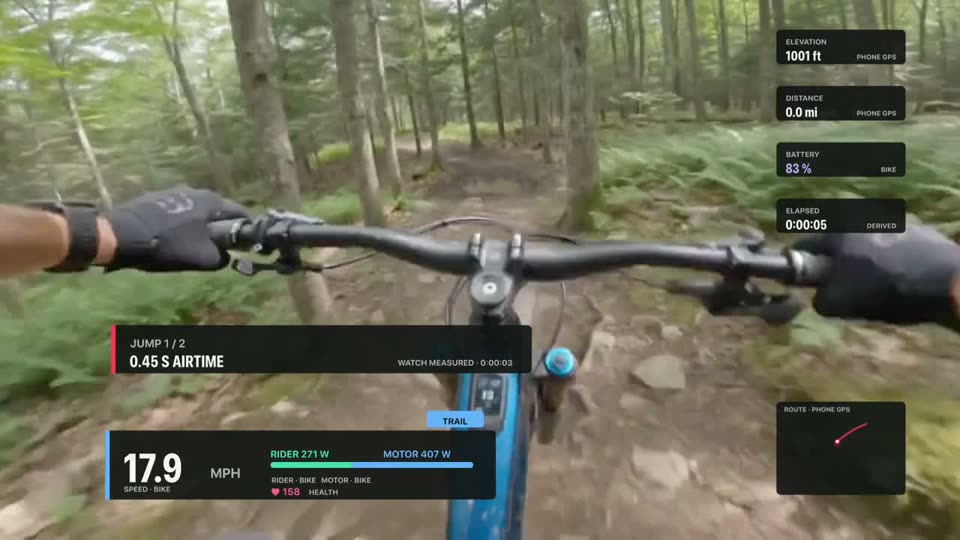
OpenLevo turns one accepted airborne event into a shareable story—not a pile of unrelated gauges. Airtime and estimated distance count through flight; at touchdown, the retained phone or wrist peak G snaps into view. The full Send It card celebrates the landing; the Airtime Ribbon keeps the next run clean and fast.

AIRTIME0.00→0.45 secCounts through flight · Watch measured
HEIGHT0.8 ftEstimated from airtime
DISTANCE0.0→11.5 ftCounts through flight · estimated
WRIST PEAK G2.8 gReveals at touchdown · experimental

Measured stays measured. Estimated stays estimated. Fresh speed, power, assist, and battery can add bike context when available, but OpenLevo never presents the motor as the inertial source. The retained impact value is a landing peak—not an invented continuous G-force trace. Missing channels simply disappear.

SEND ITLANDING LABAIRTIME RIBBON
Telemetry in the Studio

The ride, drawn honestly.

Every number on the picture is a measured channel from the ride journal, placed by you, dressed by a template, and captioned with where it came from.

  • A hundred-plus compositions, one library. Sixteen built-in templates across eleven families—Network, Film, Telemetry, Wrist, Analog dash, Digital dash, HUD, Graph & trace, Map, Stat compare, and Event & moment—plus the 21-pack Ride Film collection, the eight-pack question-driven catalogue (CHRONO, STAGE, VERT, RANGE, PULSE, SEND, DUET, BUDGET), and seven immersive treatments. Drop one on the footage, keep it or change any part.
  • Fifty instruments that move only with data. Nine kinds—needles, bars, tapes, digits, indicators, ribbons, timers, text, and images—in fifty variants, from twin power dials and the rider-motor meeting bar to assist time-share strips and jump counters. They ease between measured samples, freeze and dim when a channel goes stale, and show a dash when it is absent. No horizon, lean, or g-force is ever invented.
  • Provenance on every value. Bike, Phone GPS, Health, Watch, Garmin, Derived—the caption can be restyled and moved, never removed; a panel names its source once instead of on every row.
  • Your brand kit. Accent, secondary, canvas, ink, font roles, shape, and motion character re-dress any template; rider green, motor blue, and energy violet stay fixed so the duet always reads.
  • Privacy gates. Precise route, heart rate, and rider power appear only when you allow them, and every export is reviewed first.
  • One frame everywhere. iPhone, iPad, and Mac draw the canvas with the export renderer itself, so what you place is what ships.
Network template: broadcast score bug with speed, rider-versus-motor bar, heart rate, assist tab, rail tiles and a route card
Six families on the same trail and the same sample ride. Network, Film, and Event & moment are free; the rest are previewable now and priced only after the rider pricing study—nothing honest is ever gated.
Trail Finish + Smart Story

The ride is part of the edit.

Illustrated product view · Color workspace, Enhance › Trail Finish · sample telemetry · local workflow
Purpose-built for mountain-bike footage

Rescue the footage. Let the ride move it.

Finish mixed GoPro, DJI, Insta360, and iPhone clips with local color tools, then let fresh bike and rider evidence drive effects that a generic editor cannot understand.

01

Trail Color + four scopes

Primary correction, tone curve, three-zone cool/warm balance, vibrance, forest-shadow denoise, validated LUTs, waveform, RGB parade, vectorscope, and histogram—all on the same preview/export path.

02

Reviewable Camera Match

Compare the selected frame with the preceding camera and propose bounded exposure, saturation, temperature, and tint changes. OpenLevo shows the evidence and waits for Apply.

03

Ride Reactive

Velocity Blur follows fresh measured speed. Effort Glow follows fresh rider power. Landing Punch follows the accepted jump clock. No source means the effect turns off instead of pretending.

04

Smart Trail Masks

Track a rider-selected rectangle or ellipse locally. Solid and pixelated privacy masks fail closed; outline and glow are honest creative focus regions—not fake pixel-perfect segmentation.

05

Trail Rescue

Stage forest recovery, denoise, measured lens correction when available, stabilization analysis, and wind repair as one readable recipe. Lens, crop, motion, and audio decisions stay explicit.

06

Smart Story + social safe zones

Rank accepted jumps, climbs, descents, speed, effort, and local scenic observations into a reviewable 16:9, vertical, or square plan. You approve the cuts, private metrics, and export.

Local by design. Camera Match and Smart Story are suggestions, source video stays immutable, and nothing is uploaded or published automatically.

The whole chain, local

From wrist to reel.

Ride with only the Watch. The ride syncs to your iPhone on its own—cut the film there, or transfer the collected project to iPad or Mac. The complete edit, media links, rides, and overlays stay intact on every screen.

Illustrated pipeline: sample values. Every step ships in the app builds; watch bike-telemetry channels await hardware validation.

CAMERASGoPro HERODJI Osmo ActionDJI Osmo 360 · reframedInsta360 · reframediPhoneany MP4 / MOV · H.264 or HEVC
RIDESOpenLevo iPhone + WatchGarmin Edge · FITany GPX

No supported motor system is required to make films. Any camera above plus any ride source cuts, syncs, and exports the same way. 360° cameras go further: export the stitched equirectangular file from the maker's app once, and the Studio detects it and hands you the virtual camera — framing presets, a keyframable path, subject tracking. Pair a Turbo Levo or Bosch Smart System bike and the overlays gain the motor's own side of the story from the channels that system provides—such as speed, rider and motor power, battery, odometer, or a recognized assist mode—measured at the source.

Twelve professional workflows

From raw trail footage to a finished ride film.

Each workflow uses the same document and edit behavior on iPhone, iPad, and Mac, with a touch-native surface on mobile and a desktop workspace on Mac. ProRes 422 and Final Cut Pro XML remain explicit Mac handoffs; the edit itself stays intact.

  1. 01
    SYNC

    Automatic telemetry sync

    Compare camera capture time and local video motion with the ride start and fresh GPS movement to produce a confidence-scored suggestion. Nothing moves until you confirm it, and undo restores the previous timing.

  2. 02
    ANGLE

    Multicam editing

    Group cameras, cut between angles at the playhead, and choose a separate audio source without flattening the original clips.

  3. 03
    STEADY

    Stabilization and horizon

    Smooth camera motion, level the horizon, reserve a safe crop, and hold uncertain analysis instead of inventing movement. Lens correction activates only with a named, validated camera profile.

  4. 04
    REFRAME

    360° virtual camera

    A 2:1 equirectangular clip—an Osmo 360 or Insta360 export—becomes a camera you point afterwards. Drag the view in the player, pinch the field of view, choose Flat, Wide, Ultra Wide, or Tiny Planet framing, and switch the canvas from widescreen to vertical: the camera re-points instead of cropping. Preview and export render the same math.

  5. 05
    MOTION

    Keyframes and subject tracking

    Animate position, scale, rotation, crop, opacity, audio, telemetry overlays—and the 360° camera path—with linear, ease-in, ease-out, ease-in-out, or hold curves. Arm Record Perspective and every drag writes keyframes at the playhead; Follow Subject tracks a rider from the playhead onward and steers with editable keyframes, holding its last heading and flagging spans for review when confidence drops.

  6. 06
    PRIVACY

    Tracked masks

    Follow a face, plate, or selected region with an editable rectangle or ellipse, pixelation or a solid mask, intensity, timing, and manual review keyframes. Masks stay attached through trim, move, split, duplicate, and delete edits.

  7. 07
    COLOR

    Pro color tools

    Inspect RGB and luma scopes, apply local .cube LUTs, choose a color-space intent, and control LUT intensity without changing source media.

  8. 08
    SOUND

    Advanced audio repair

    Adjust high-pass frequency, noise gate, compressor threshold and ratio, limiter, stereo pan, normalization, ducking, and source-derived waveforms.

  9. 09
    STORY

    Telemetry-assisted editing

    Find ride moments from available channels—maximum speed, power, heart rate, grade, or battery change—and add reviewed markers without fabricating missing data. Auto-Story assembles the moments into a first-draft highlight reel you reshape, not a finished cut you fight.

  10. 10
    SEEN

    Vision highlights

    On request, Apple's on-device scene classifier watches your footage and marks moments from a curated list—trail, cycling, forest, sunset—each labeled as what it is: camera-observed, never telemetry. A measured moment the camera corroborates rises in Auto-Story with both evidence lines shown. No cloud, no face recognition.

  11. 11
    ORGANIZE

    Compound clips

    Group a sequence, open and edit its child names and timing, rename or duplicate it, then break it apart while preserving timing, transitions, and privacy masks.

  12. 12
    DELIVER

    Share-ready delivery

    Choose where it's going: YouTube, Instagram, and Reels/TikTok presets reframe the timeline to the destination and burn telemetry into the picture, with a privacy review before render. File export keeps ProRes 422 and a Final Cut Pro XML handoff that preserves explicit timeline gaps and reports what transfers.

The editor in your pocket—or your pack.

The Video tab on iPhone and iPad is a real ride-film editor in the shape you already know from the GoPro, DJI, and Insta360 apps: the video up top with overlays you drag into place, a filmstrip with a playhead and yellow trim handles beneath it, and tools along the bottom. Plug a GoPro HERO or DJI Osmo Action — or its microSD — straight into the phone, pick from Photos, or import any camera’s standard MP4 or MOV; 360° footage from an Osmo 360 or Insta360 comes in through its maker’s equirect export. Each clip auto-matches the ride recorded while it was filmed. Pick an overlay template, dress it with a brand kit, and adjust any gauge—the phone canvas shows the exact frame the export will write. iPhone keeps the magnetic story focused; iPad opens the same document into ordered video, audio, telemetry, title, and mask tracks without flattening the Mac timeline.

The Video tab on iPhone and iPad. The Network template on the canvas, drawn by the export renderer itself; a template gallery, brand kit, and component controls in the Overlays tool; iPad expands the same project into ordered tracks. Illustrated product view · sample values.

What iPhone and iPad edit.

The engine is the Studio’s own — iPhone, iPad, and Mac open the same complete project file, and divergence between them is a bug by definition.

The Video tab, in full

Cameras inGoPro HERO, DJI Osmo Action, Insta360, iPhone — any camera’s standard MP4 or MOV over USB-C, microSD, or Photos; 360° via the maker’s equirect export (Osmo 360, Insta360 X).
Complete timelinesAppend, insert, overwrite, replace, split, trim, slip, duplicate, lift, ripple delete, copy, paste, reorder, transition, zoom, and snap—with ordered tracks on iPad and focused lanes on iPhone.
Canvas, titles & soundTransform, crop, speed, reverse, freeze, canvas presets, titles, markers, waveforms, detached camera audio, music, narration, fades, pan, normalization, ducking, voice-over, and repair.
Telemetry & syncEvery overlay metric, the eleven-template gallery and brand kits, gauge components with honest motion, the classic readout styles, saved presets, dashboard groups, per-clip ride links, explicit smoothing, provenance, privacy controls, and reviewable evidence-based synchronization.
360° & keyframesDirect pan, tilt, roll, and field-of-view control; Record Perspective; Follow Subject; editable keyframes and interpolation on the same spherical render path as Mac.
Trail finishingTone curve, color balance, denoise, four scopes, Camera Match, Ride Reactive effects, tracked privacy and creative regions, Trail Rescue, measured lens profiles, stabilization, Vision highlights, multicam, compounds, and Smart Story remain editable instead of being flattened.
Projects that travelCollect media, rides, and the complete edit into one integrity-checked project; relink without losing identities, recover autosaves, and continue on another OpenLevo device.
DeliveryH.264/HEVC and social presets render locally on iPhone, iPad, or Mac. ProRes 422 and Final Cut Pro XML are named, fidelity-preserving Mac handoffs—not mobile substitutes.

A video editor that already feels familiar.

Media and overlay libraries sit on the left. The viewer is in the center, the inspector is on the right, and the multi-track timeline is below. Space plays and pauses; Command-C copies; Command-V inserts; Shift-Command-V appends; Command-E exports.

Everything needed for a ride story

Overlay templatesSixteen built-ins across eleven families, the 21-pack Ride Film collection, the eight-pack catalogue—CHRONO, STAGE, VERT, RANGE, PULSE, SEND, DUET, BUDGET—and seven immersive treatments: more than a hundred compositions, each a component graph you can re-dress with a brand kit, save as your own template, and share as a file. The classic presets remain.
Telemetry librarySpeed, rider and motor power, rider share, cadence, heart rate, battery, remaining energy, assist mode, elevation, grade, ascent, distance, elapsed time, route markers, and jump airtime—every channel carries its provenance.
Visual controlMove a selected visual directly in the viewer, resize from any corner, rotate from its handle, and use 5%/10% safe guides. Hold Shift for axis, scale, and 15-degree rotation snapping. On a 360° clip the same drag points the camera, with live feedback while you hold it.
360° reframingEquirectangular clips get a virtual camera: Flat, Wide, Ultra Wide, and Tiny Planet framings; pan, tilt, roll, and field of view on the ordinary keyframe clock; and a canvas switch that re-points the camera into vertical instead of cropping it.
Manual syncMap video time to ride time with a precise offset and inspect the result at the playhead.
Real timelineLayer video, stills, music, narration, titles, and telemetry across ordered tracks. Copy an occurrence, then Insert, Overwrite, Append, or Replace; slip source In/Out by frame without moving the edit. Locked or incompatible tracks refuse the command, and one undo restores the whole change.
ComponentsFifty variants across nine kinds: single, twin, and reserve needle gauges; linear, arc, segmented, split, ring, and time-share bars; speed, elevation, and course tapes; seven-segment, LCD, rolling, mono, plate, poster, and effort digits plus the jump count/best/total counters; gear, marker, scanner, and moment indicators; eight ribbons from elevation to living terrain, replay, and the closing signature; five timers; text and a logo—plus Card, Gauge, Minimal, Compact, and Micro readouts. Needles ease only between measured samples, freeze and dim when a channel goes stale, and show a dash when it is absent.
Finishing controlsAdjust transforms, crop, speed, reverse, freeze frame, stabilization, color, titles, fades, normalization, ducking, voice-over, canvas, codec, frame rate, destination presets, and export range.
Numbers you can readEvery parameter shows its value—scrub the readout, click to type, double-click to reset—and a keyframe diamond on each row lights exactly when a keyframe exists at the playhead.
Built for long ride edits, not fragile demos.

Generate lightweight proxies for smooth editing, relink a moved media folder without losing decisions, recover a consistent autosave, or collect the footage, ride journal, and portable project into one reviewed folder.

A professional local workflow

Source waveformsAudio shapes come from the media samples, with measured-peak normalization and deterministic music ducking.
Export queueQueue multiple H.264 or HEVC outputs, monitor progress, cancel safely, and reveal completed files in Finder.
Privacy reviewReview route, heart rate, and rider power before every export; sensitive channels stay project-gated.
Source-preserving retimingReverse a selected range with its linked camera audio or hold a frame without modifying the original media.
Truthful limitsUnsupported HDR conversion, optical-flow retiming, and video corner rounding are identified instead of simulated.

The data stays honest.

The exported overlay uses the same timing and values shown in the viewer. A dropped stream becomes unavailable instead of freezing an old number on screen.

Measured stays measured

Bike, phone GPS, watch, Garmin, measured health, and derived values retain their provenance throughout import, preview, and export. A Garmin file shows "SPEED · GARMIN"—and never invents the motor channels it cannot see. What the camera saw is labeled camera-observed, never presented as telemetry.

Private by default

The editor works locally. Nothing is uploaded, and sensitive overlays are added only by the rider.

Recoverable projects

Projects autosave references, sync, units, layout, style, and timing. Source video and ride journals remain immutable.

Scriptable, and AI-native.

The Studio's engine runs without its window: a 35-command line tool and a 36-tool MCP server drive the same import, template, Auto-Story, and export pipeline the app uses. Point any MCP client—Claude Desktop included—at your Mac and the editor answers in conversation; point a script at it and it answers in files.

One engine, two doors

The window and the command line share one project document and one set of edit rules. Whatever an assistant asks for is exactly what the app would have done.

The footage stays home

The connector runs locally and reads only the files you name. An assistant works from project summaries and file paths—your video and ride files are never uploaded by the Studio.

Ask for the finished thing

"Cut a vertical reel of the fastest sections with speed burned in—and dress it with the DUET pack" is one request: import, sync, template, Auto-Story, and a Reels-ready export, rendered on your machine.